.png?width=120&height=121&name=CustomerHappy_V2%20(4).png)


If you've ever tried to contact Google for help with your Google Business Profile, you'll know it isn't always straightforward.
Whether you're dealing with missing Google reviews, a suspended profile, incorrect business info, Google Maps issues or trouble updating your services and products, finding the right support channel can be hard work.
Google manages millions of Business Profiles worldwide, so it relies massively on online Help articles rather than traditional customer service. Phone support is very rare, live chat and video calls are only available for some problems, and the support options you see can vary depending on your account and the problem you're experiencing.
The good news is that Google does provide support—you just need to know where to find it.
The support process is designed to encourage self-service first. In most cases, you'll be guided through Google's Help articles before you're given the option to contact a support agent or ask the Google Community for help.
How to Reach Google Business Profile Support
If you want to...
Solve a common issue yourself → search Google's Help articles.
Contact Google directly → submit a Google support request.
Get advice from experienced users → Post to the Help community for answers
Step 1: Search for Your Issue
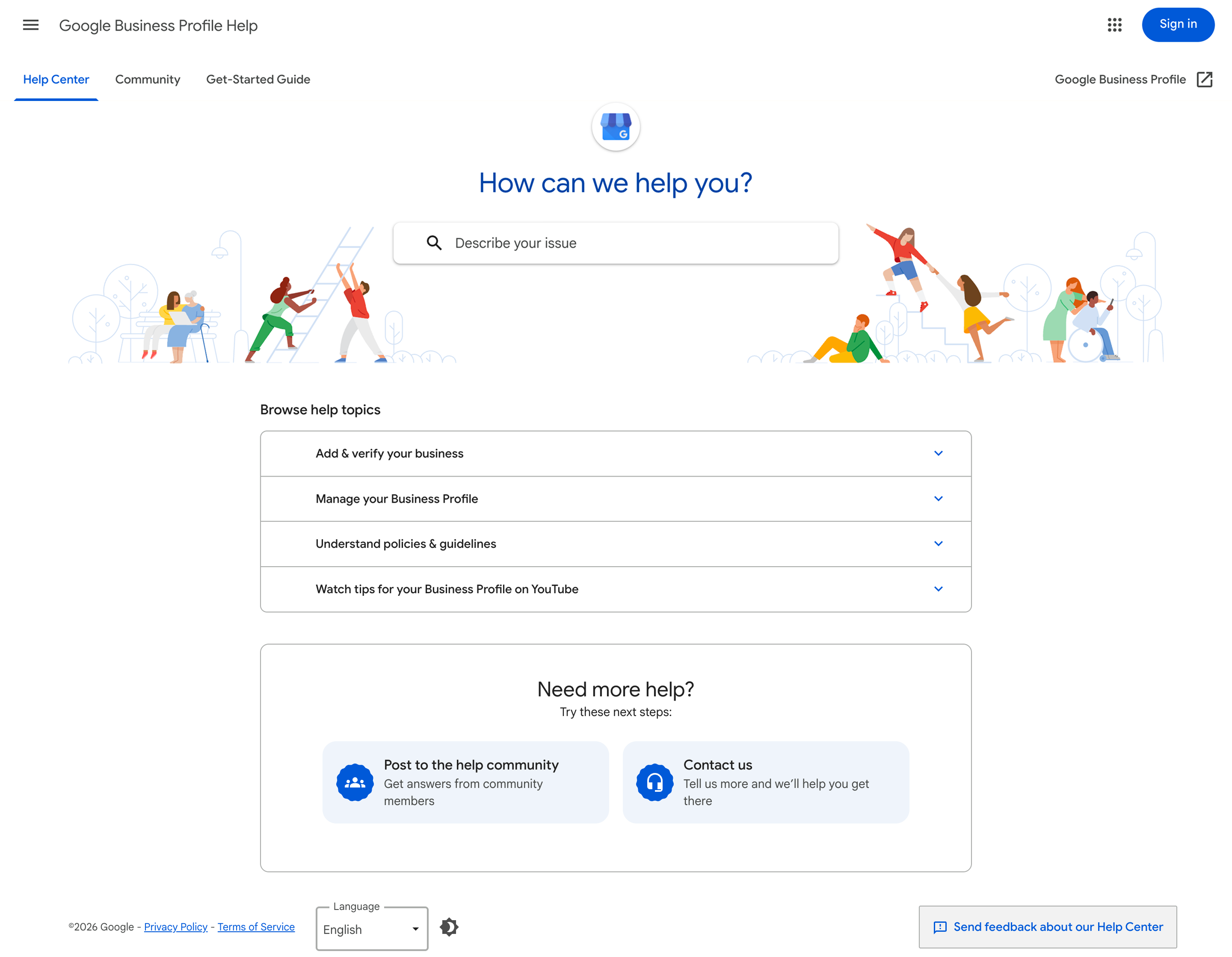
Start by heading to the Google Business Profile Help Centre:
https://support.google.com/business/
Use the search tool to describe your issue—for example:
- Missing Google reviews
- Suspended Business Profile
- Can't verify my business
- Ownership or access issues
- Google Maps location problems
At this stage, Google is trying to resolve your issue through self-service, so you'll see list of recommended Help articles based on your search.
Often, the suggested articles will solve the problem without you needing to contact support.
If one of the articles fixes your issue, you're done.
If not, continue to the next step.
Step 2: Choose Your Support Option
If Google's Help articles don't cut it, scroll to the bottom of the Help Centre page to find your next support options:
- Contact Us
- Ask the Community
If you want Google to investigate your issue directly, choose Contact Us.
Or, if you'd like advice from experienced Google Business Profile users first, choose Ask the Community.
Both options have their place, and you can use either—or both—depending on your situation.
Option A: Contact Google Support
Click Contact Us to start Google's support process.
First, you'll be asked to choose the category that best matches your issue. Google will recommend another set of Help articles related to your selection.
This is intentional. Before allowing you to contact a support agent, Google tries one final time to solve your issue using self-service resources.
If the suggested articles don't solve the problem, continue through the prompts until Google presents the available support options for your account. Depending on your problem, this might include submitting a support request, starting a live chat or requesting a callback. Not every contact method is available for every issue.
When completing your support request:
- Clearly explain the issue.
- Include when the problem started.
- Mention what you've already tried.
- Attach screenshots if they're relevant.
The more detail you provide, the easier it is for Google's support team to understand and investigate the issue.
After submitting your request, you'll receive a confirmation email or support thread, depending on the contact method you selected.
It's common to receive an automated response first.
If the suggested solution doesn't solve your problem, reply to the existing support thread with additional information rather than starting a new conversation.
Occasionally Google will close a ticket without fully resolving the problem. If this happens and you've exhausted the original conversation, submit a new support request. Many businesses find it takes more than one request before their case is reviewed by a real person.
It's also a good idea to keep a record of every support ticket ID, along with the description, screenshots and evidence you submitted. If you need to raise another request, you'll have everything ready to reference previous conversations.
Option B: Ask the Google Business Profile Community
The Google Business Profile Community is a public forum where you can ask questions and receive advice from:
- Google Product Experts (experienced volunteers)
- Other business owners
- Occasionally, Google staff
When creating a post, explain your issue clearly, include screenshots and mention the troubleshooting steps you've already tried.
The Community can be especially helpful for unusual issues or when you're looking for advice from people who have experienced the same problem.
Need a Hand?
If managing your Google Business Profile is becoming time-consuming, our Better Listings team can help.
As part of the service, we'll optimise your Google Business Profile and help you navigate common issues like verification problems, missing reviews, profile updates, Google Maps issues and general Business Profile management.
While we can’t guarantee Google’s decisions or influence their support process, we work with these issues every day. Our team has a bunch of experience helping businesses identify the problem, uncover the best course of action, and navigate Google’s support channels.
If you'd like an experienced team in your corner, we'd be happy to help!
Frequently Asked Questions
How do I contact Google Business Profile support?
Head to the Google Business Profile Help Centre, then select Contact Us at the bottom of the page. Follow the prompts to see which support options are available for your account and issue.
Does Google have a phone number for Google Business Profile support?
Google doesn't have a public phone number for Business Profile support. In some cases, a callback option might appear after you complete the online support process, but it's not available for every issue or account.
Can I email Google Business Profile support?
You can't email Google Business Profile support directly. You'll need to start through the Help Centre. If email support is available for your problem, Google will offer it as one of the contact options.
Why can’t I see the Contact Us option?
Google’s support options can vary depending on your account, location and the issue selected. If Contact Us is unavailable, review the recommended Help articles or post your question in the Google Business Profile Community.
How long does Google Business Profile support take to respond?
Response times vary. Some requests receive a response within a few minutes, while more complicated issues can take longer, particularly if they need to be manually reviewed.
Where can I find the Google Business Profile Community?
The Google Business Profile Community is available through the Help Centre here. It is a public forum where Product Experts and other business owners share troubleshooting advice and possible solutions.
Can betterbunch contact Google on my behalf?
As part of our Better Listings package, we can help spot the issue, prepare the information Google needs, and help you navigate the Google support channel. We can't bypass Google’s process or guarantee its decisions, but we can certainly help make the process easier to navigate.


Get a free reputation audit
Schedule a 1:1 call today and discover how to win on trust.

Articles you might like
How to turn a good review into a social media post
If a customer says something worth repeating, repeat it.
Read
The impact of a Google Business Profile on local SEO
When you're looking for a local service or business, where's the first place you turn to? Well, it might've once been the Yellow Pages, but these days it's almost always Google. Since the internet ...
Read
A good guarantee works both ways
It should make customers feel safer choosing you, and hold your business to a higher standard.
Read.png?width=768&height=591&name=TeamBrainstorm_Blue%20(1).png)